AU Корабли

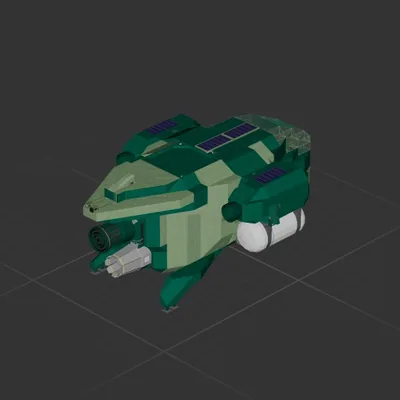
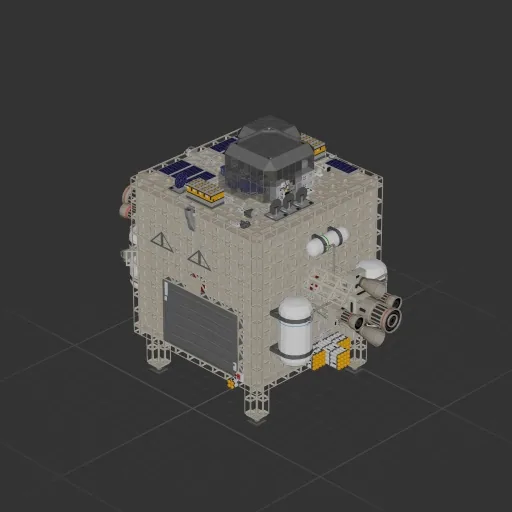
Hazard Barrel Misssion Ship Autobps/Hover

Автор в Мастерской: SenseiTrash · Steam ↗
Межпланетный Целый корабль Крупный

Hazard Barrel Misssion Ship Autobps/Hover

Характеристики

3 486 Деталей
81 Видов деталей
20 Двигателей
2 453 Клеток кабеля
693 Рам
340 Деталей оборудования

Состав двигателей

  • Подъёмные4
  • Топливные маршевые4
  • Электрические маршевые6
  • Маневровые6

Оснащение

  • Кресло пилота 1
  • Топливные баки 6
  • Солнечные панели 12
  • Батареи 24
  • Логические схемы 32
  • Радиоканалы 55
  • Экраны и камеры 1
  • Радар 1
  • Топливная магистраль 64

Чаще всего использованы

  • Power Cable 1 762
  • Data Cable 691
  • Frame Full 473
  • Frame Half 127
  • Frame Half Curved 5 62
  • Wireless Transmitter 55
  • Glass Full 24
  • Pipe Corner 18

Описание автора

Perpose build ship for transporting the demonco- hazard barrel This uses a odometer alongside the scanner and long-range distance meter to get you to outcast base with minimal input How!: (this is how I did it at least u can feel it out if u want) 1. Put the barrel in the middle of the box and close the doors 2. Press and hold the up button to get off the floor 3. Turn on gyroline and turn off manual mode to activate the nose style auto hover. This will send you to 250k alt 4. Turn off gyroline, aim around the planet, and put the target to -1m (yes thats negitive) (try and get around the planet to see outcast and the star) 5. Once around the planet, aim at outcast and position the red star directly above it(or as close as you can) 6. Once in position start pitching down until the scanner (at 0) reads inf 7. Put target to -300m (again this is negitive) and wait. Make sure the barrel stays in the center while the alram is going off (+90k m/s)[barrel movement will be patched out at some point] 8. Once at -300m switch to scanner, aim at outcast, and put target to +1m (this is a postive number lmao) 9. Once at 1m, SWITCH OFF FUEL, switch to Long-Range Distance Meter and find base with radar 10. Once above base turn off manual and turn on gyro to hover and try to get stable, aim at the landing pad, and put target to like 15 then the nightmare is over Tags: hazerd berral Planeteer

Как установить этот корабль

  1. Скачайте ZIP. В каждом архиве два файла с одинаковыми именами — .bp и .bpmeta. Нужны оба: .bp это сам корабль, .bpmeta хранит его название. Один только .bp в игре не появится.
  2. Распакуйте в папку Blueprints. Вставьте %USERPROFILE%\AppData\LocalLow\ApproximatelyGames\ApproximatelyUp\Blueprints в адресную строку проводника и положите туда оба файла. Имена не меняйте — игра связывает пару именно по имени.
  3. Перезапустите игру и откройте меню чертежей. Папка читается при запуске, поэтому игру надо перезапустить. Откройте меню чертежей, найдите корабль по названию и загрузите. Перед вылетом проверьте его рядом с гаражом.

Подробная инструкция →

Похожие корабли

Interplanetary N-1
Interplanetary N-1

Interplanetary N-1

Jelly Jiggler

2 714 деталей Крупный

Межпланетный

MOSSBACK - MID GAME DUO SHIP

MOSSBACK - MID GAME DUO SHIP

Aphotic 3.0

2 260 деталей Крупный

Межпланетный

Stardestroyer
Stardestroyer

Stardestroyer

At_My_demo

3 115 деталей Крупный

Межпланетный

USEFUL SHIP
USEFUL SHIP

USEFUL SHIP

Brick4512

1 733 деталей Крупный

Межпланетный